Knowledge base
Every guide and the common questions, grouped by topic.
📱 Trucker Tools App
For drivers: tracking, location settings, documents — and the #1 'not tracking' fix.
 🚛 Driver📲 App⭐ Start here
Broker says I'm not tracking — but I have the app
The #1 tracking problem. Run this checklist in order — most fixes take under a minute.
Open →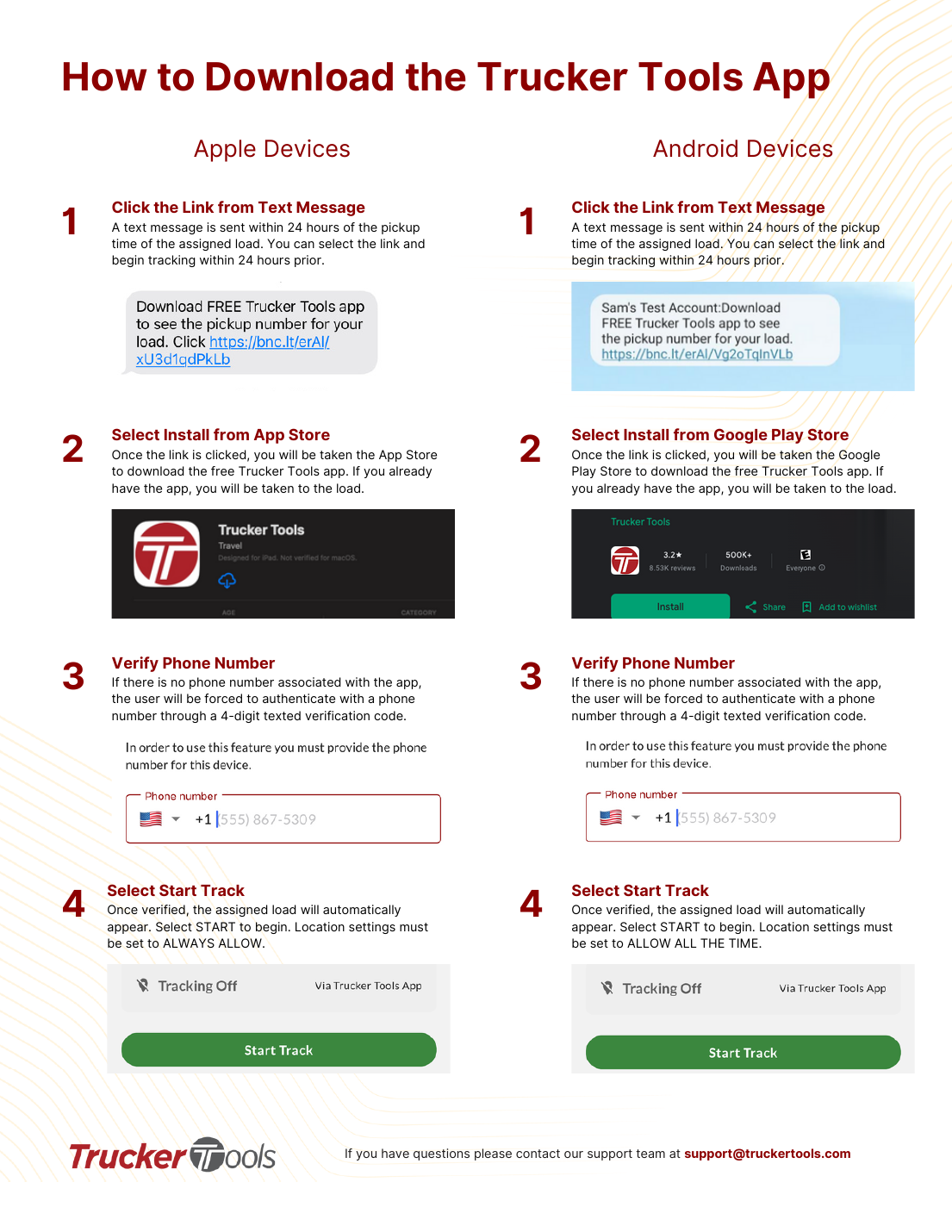 🚛 Driver📲 App
Download the Trucker Tools driver app
Install the free Trucker Tools app from a tracking text link and verify your phone to start a load track.
Open →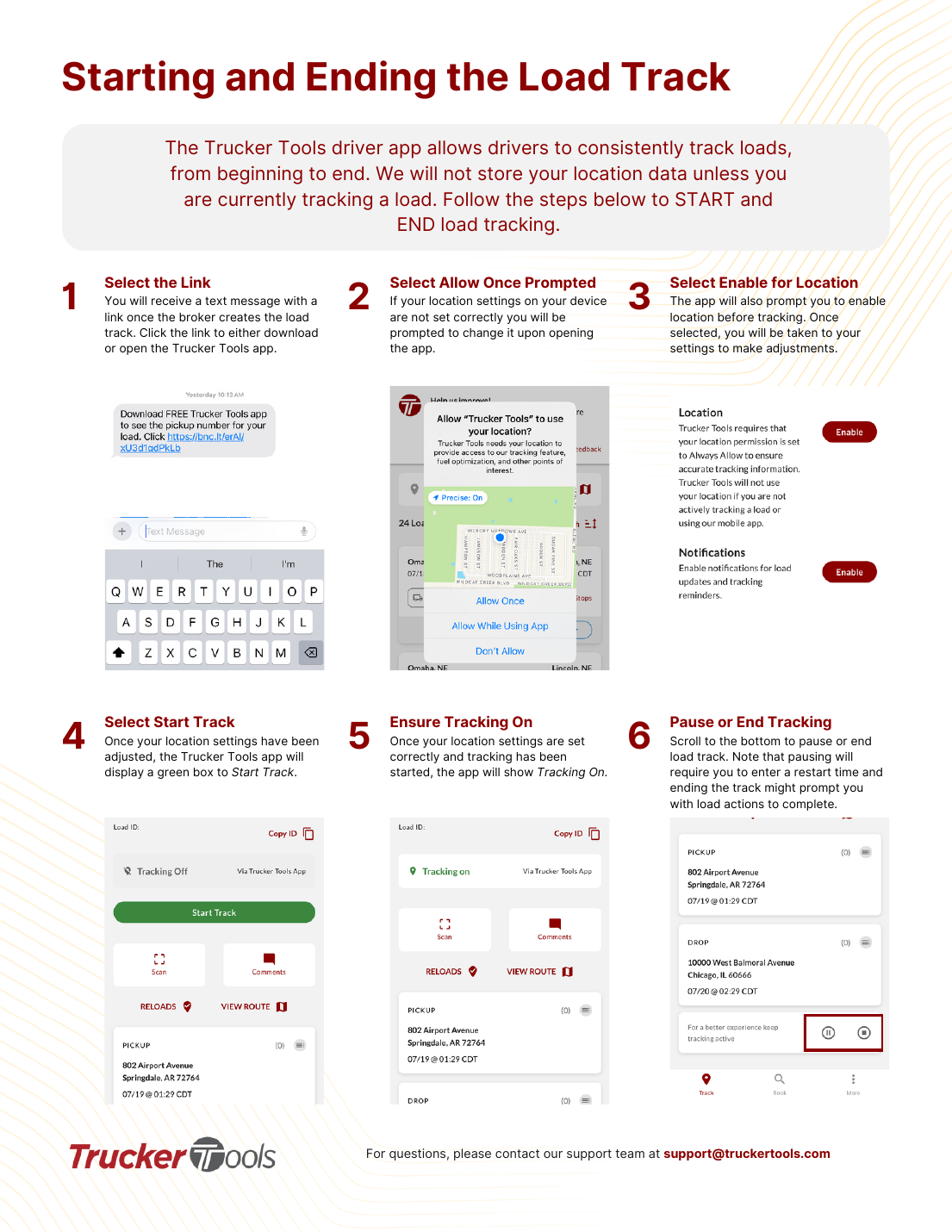 🚛 Driver📲 App
Start and end a load track (Trucker Tools app)
Open the load from the text link, allow location, start tracking, and pause or end when done.
Open →- 🚛 Driver📲 App
Fix location settings — iPhone (Apple)
Set Trucker Tools location to 'Always' with Precise Location so tracking stays on the whole trip.
Open → 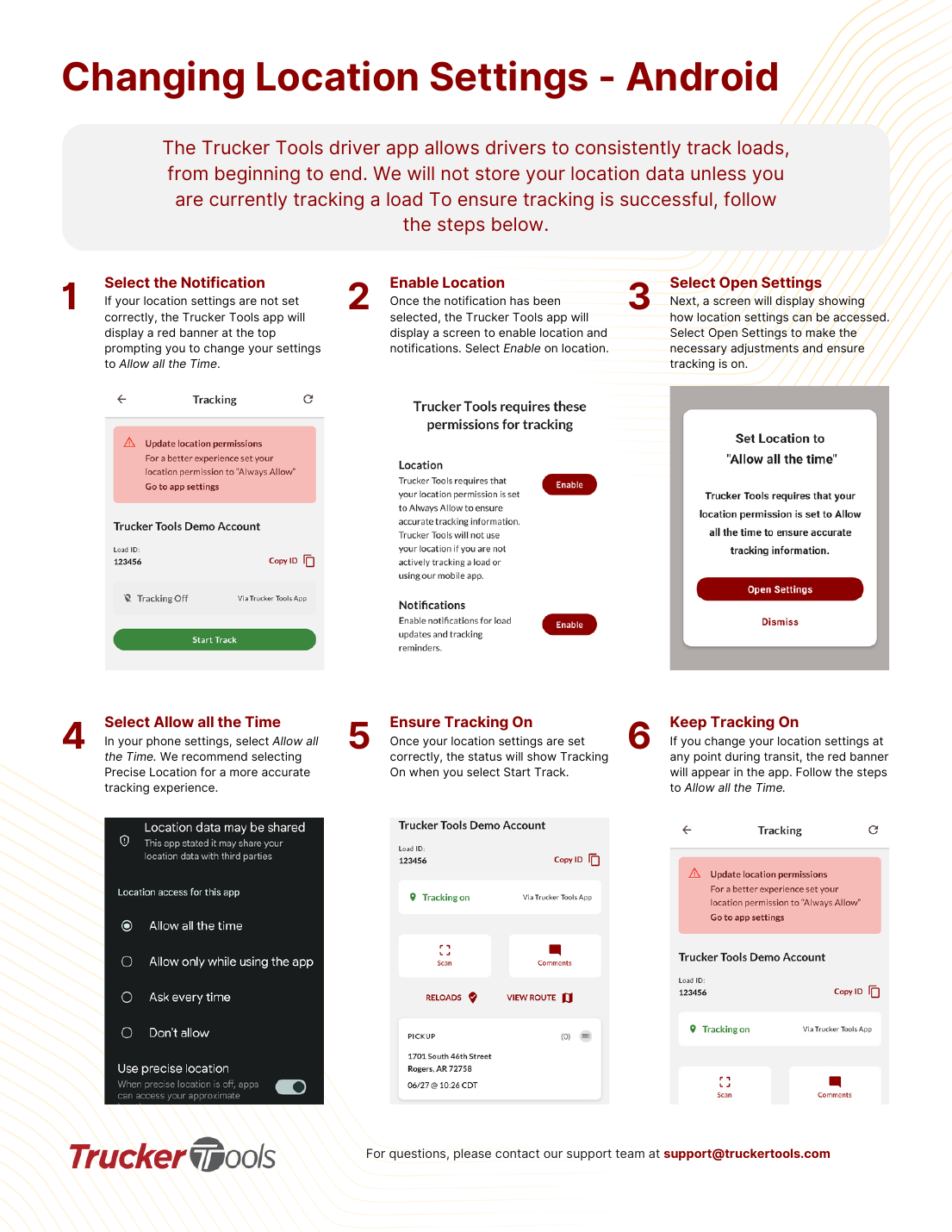 🚛 Driver📲 App
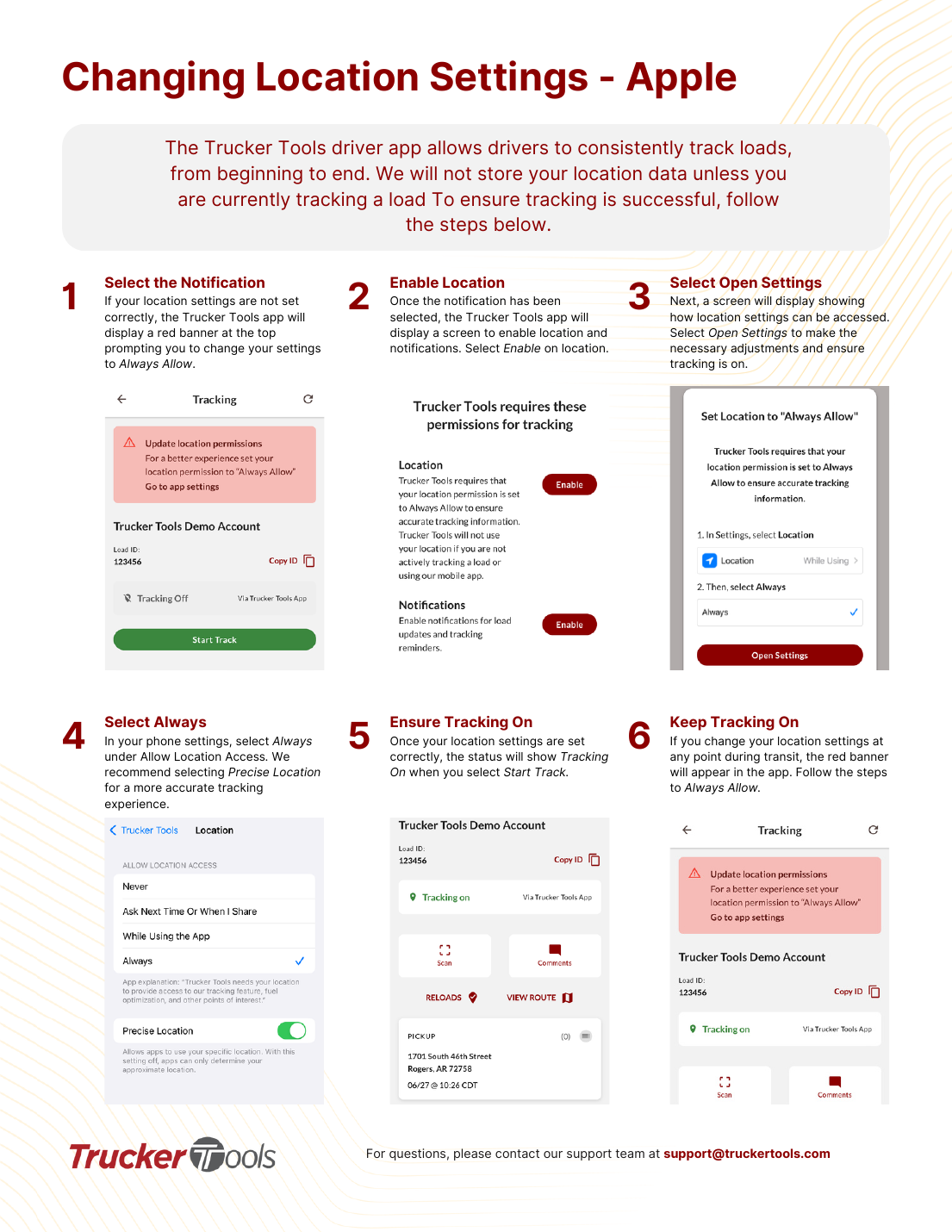
Fix location settings — Android
Set Trucker Tools location to 'Allow all the time' with Precise Location to keep tracking reliable.
Open →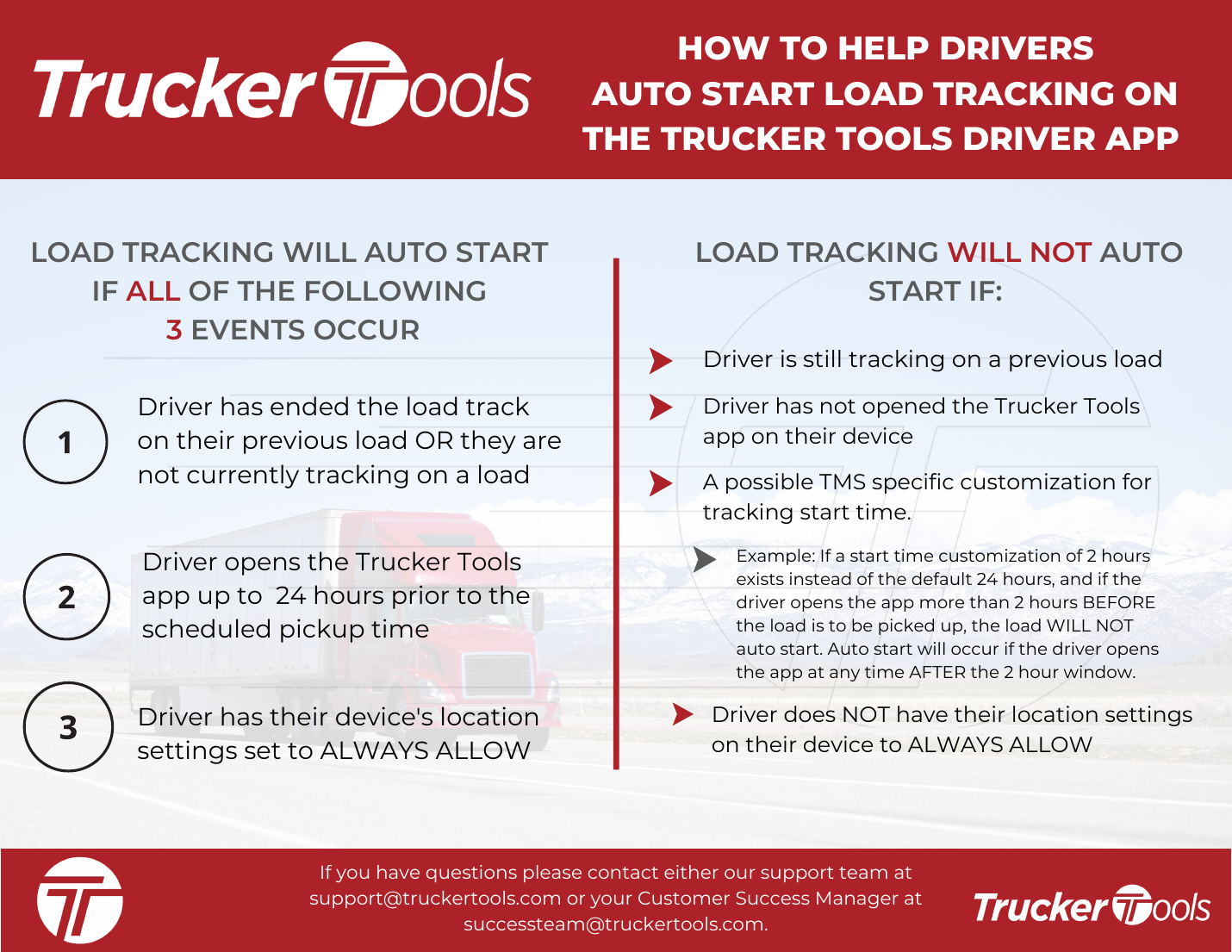 🚛 Driver📲 App
How auto-start tracking works (Trucker Tools)
Load tracking auto-starts only when three conditions are all met — here's what they are and why it might not.
Open →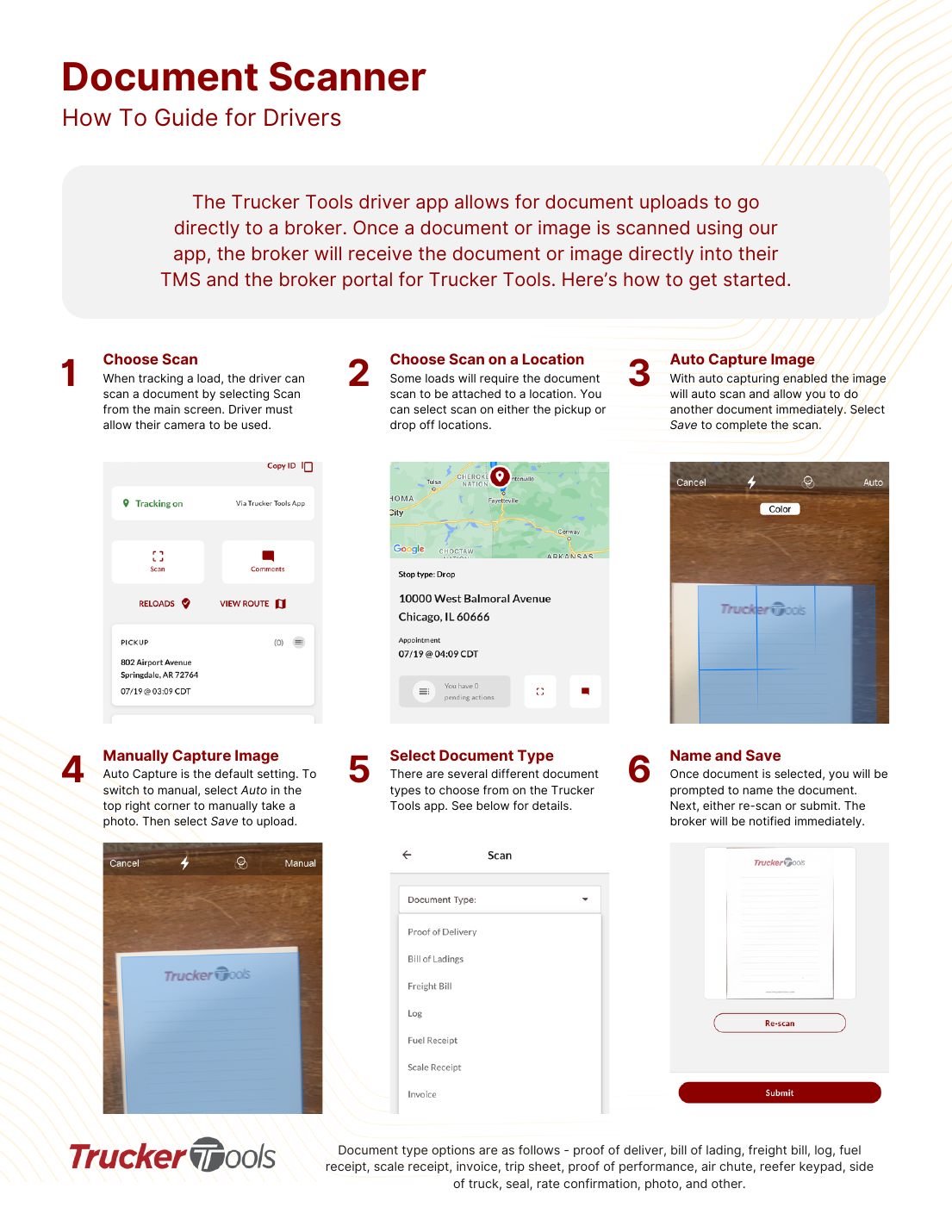 🚛 Driver📲 App
Scan and upload documents (Trucker Tools)
Scan a BOL, POD, or other document in the app and it goes straight to the broker's TMS and portal.
Open →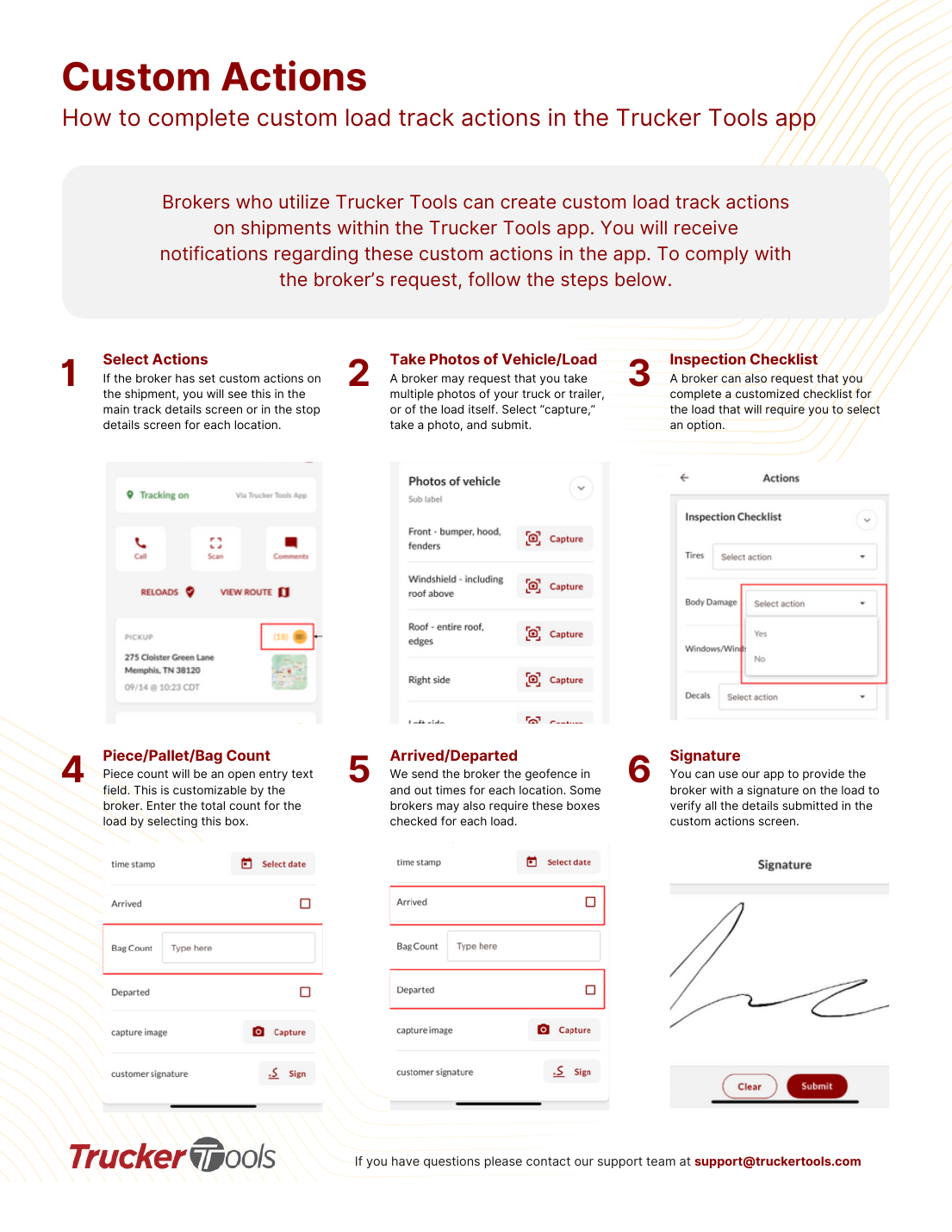 🚛 Driver📲 App
Complete custom load actions (Trucker Tools)
Brokers can add custom actions — photos, checklists, counts, signatures — to a load. Here's how to complete them.
Open →
Common questions
Tracking isn't working — first thing to try?⌄
The broker says I'm not tracking, but I have the app — why?⌄
My phone keeps dropping tracking / I see a red banner.⌄
When does tracking auto-start?⌄
How do I download the Trucker Tools app?⌄
How do I send the broker a document (BOL/POD)?⌄
What are 'custom actions' the app is asking me to do?⌄
🗺️ MacroPoint App
For drivers: install the Descartes MacroPoint app, set location, and read tracking statuses.
 🚛 Driver📲 App⭐ Start here
MacroPoint says I'm not tracking — fix it
The most common MacroPoint tracking problems for drivers, in order. Most take under a minute.
Open →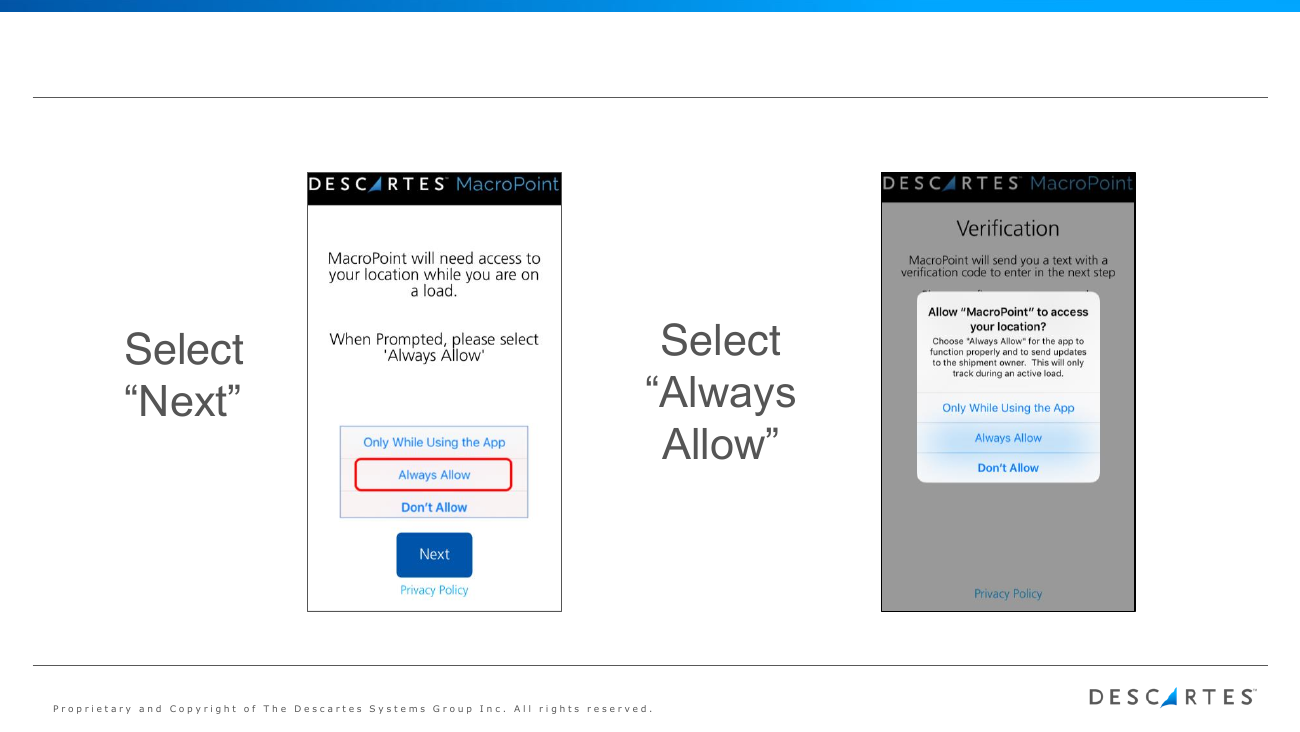 🚛 Driver📲 App
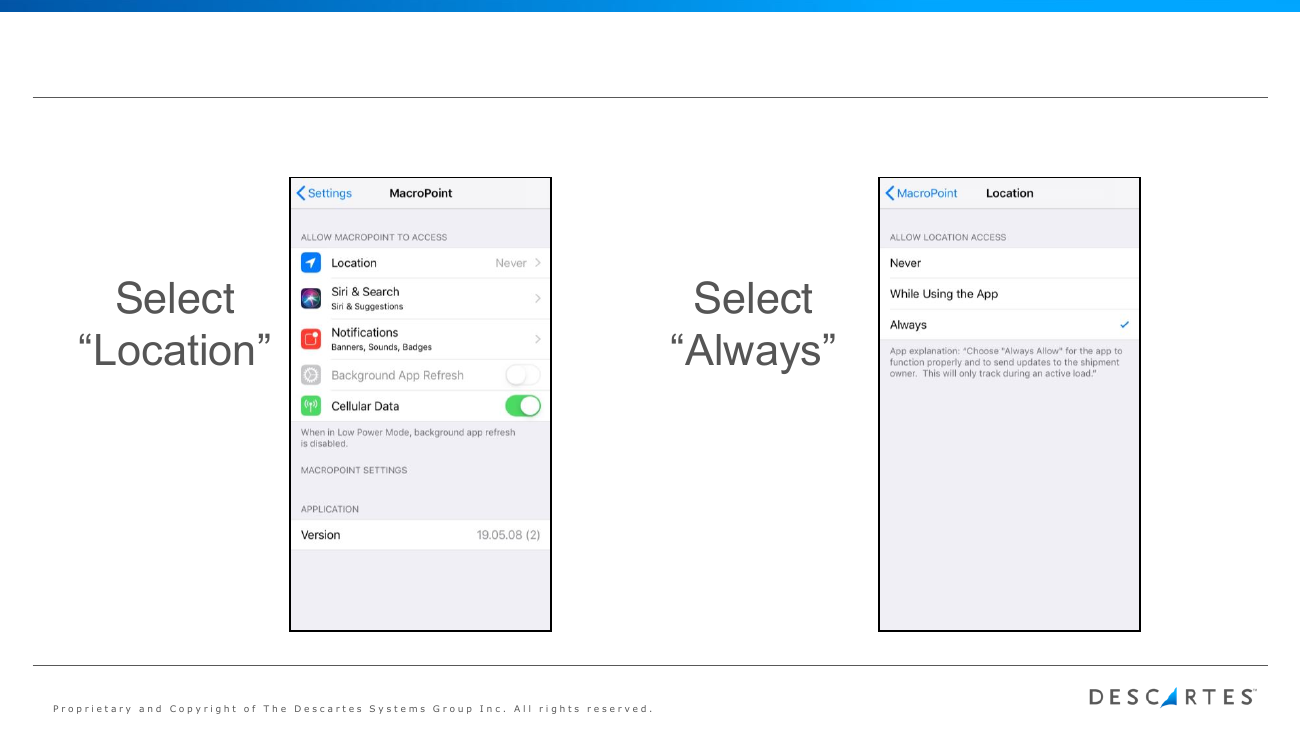
Install the MacroPoint driver app
Download Descartes MacroPoint for Truckers, set location to Always, and verify your phone — about a minute.
Open →- 🧑💼 Dispatcher🔌 Integration
Connect your tracking to MacroPoint (ELD/GPS, TMS, or app)
The three ways a carrier can feed location to Descartes MacroPoint, and how to get set up — all free.
Open → 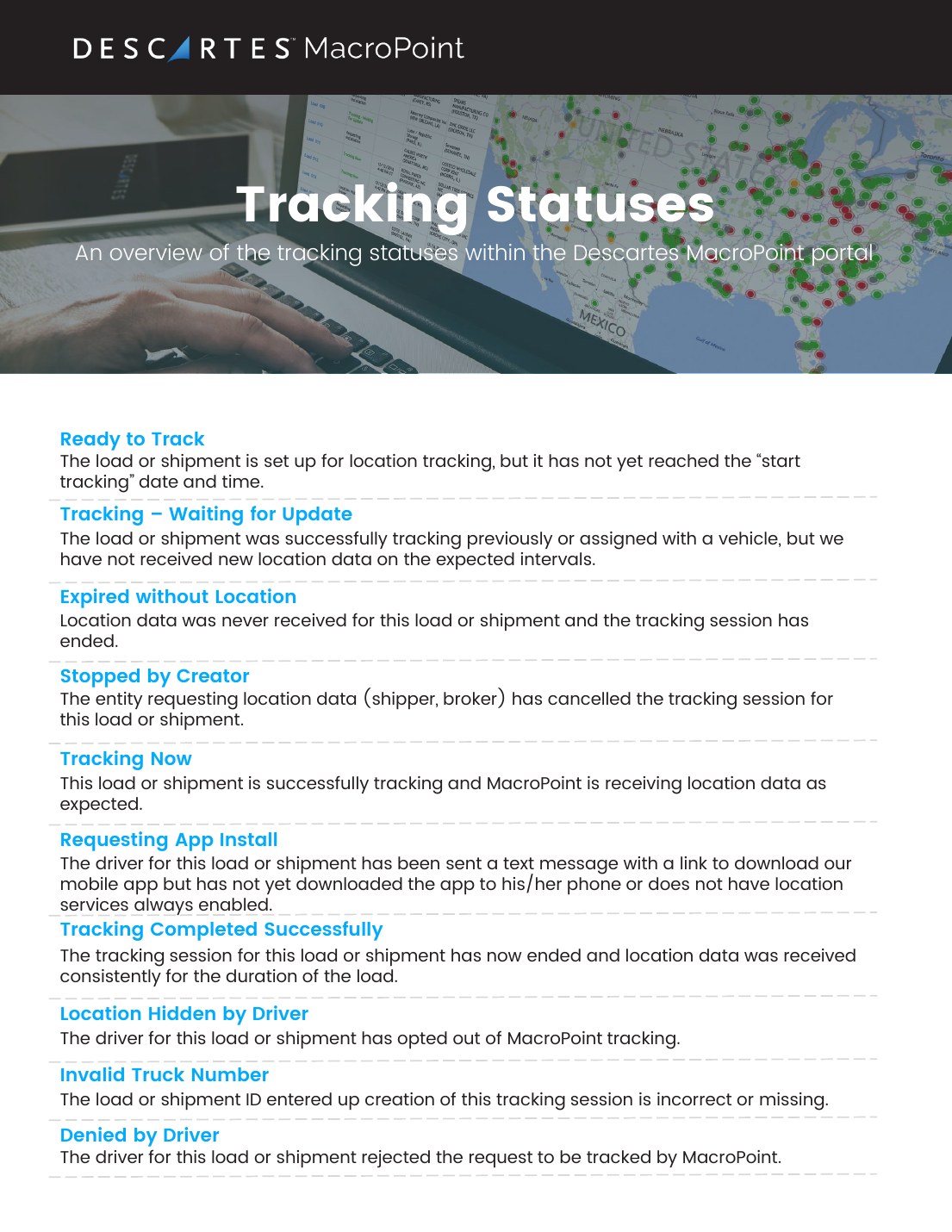 🧑💼 Dispatcher🔌 Integration
MacroPoint tracking statuses explained
What each Descartes MacroPoint tracking status means and what to do about it.
Open →
Common questions
MacroPoint isn't tracking — first thing to try?⌄
How do I install the MacroPoint driver app?⌄
Why does MacroPoint need 'Always Allow' location? Is it tracking me all the time?⌄
I never got the PIN / my PIN won't work.⌄
What does a MacroPoint status like 'Tracking – Waiting for Update' mean?⌄
How does a carrier connect tracking to MacroPoint?⌄
✅ BotLine Verification
No-app driver check-in: confirm phone, location, and a live proof photo from a text link.
- 🚛 Driver✅ Verify⭐ Start here
My BotLine check-in won't go through
The quick fixes when a BotLine check-in won't submit. Most go through in under a minute.
Open → - 🚛 Driver✅ Verify
Do a BotLine check-in (start to finish)
Finish a BotLine check-in from the text link — no app, under a minute.
Open → - 🚛 Driver✅ Verify
The BotLine link won't open
Open the BotLine link in Safari or Chrome and turn off any VPN — that fixes it.
Open → - 🚛 Driver✅ Verify
Turn on location for BotLine
Tap Allow when BotLine asks for location. If you missed it, allow location for your browser and reload.
Open → - 🚛 Driver✅ Verify
Take the photo BotLine asks for
Take a live photo of exactly what BotLine shows — DOT, VIN, a street sign, or the area. Not paperwork.
Open → - 🚛 Driver✅ Verify
Enter your BotLine code
Type the 3-digit BotLine code with the big buttons. It never uses 0.
Open → - 🚛 Driver✅ Verify
I didn't get the BotLine text
Check your number with the broker, look in spam/blocked, and have them resend.
Open → - 🧑💼 Dispatcher✅ Verify
Send a BotLine verification (dispatchers)
Send a no-app check-in request; BotLine confirms the driver's phone, location, and proof photo, then shows the result in the portal.
Open →
Common questions
What is BotLine — do I need to download an app?⌄
The BotLine link won't open.⌄
BotLine won't take my location, or says location is off.⌄
My BotLine check-in won't submit.⌄
BotLine is asking for a photo — why?⌄
🛰️ Samsara
For carriers/dispatch: connect your Samsara ELD to Trucker Tools, or share a live-location link.
- 🧑💼 Dispatcher🔌 Integration
Share your live location (Samsara)
Generate a public, time-limited Live Sharing link so a broker can see the truck's location without a Samsara login.
Open → - 🧑💼 Dispatcher🔌 Integration
Connect your Samsara ELD to Trucker Tools
Authorize Trucker Tools to pull your Samsara vehicle/trailer GPS so loads track automatically by truck number — no driver app needed.
Open →
Common questions
How do I connect my Samsara ELD to Trucker Tools?⌄
How do I share a live-location link from Samsara?⌄
A truck isn't showing after connecting Samsara — why?⌄
📍 Motive
For carriers/dispatch: connect your Motive ELD to Trucker Tools, or share a live-location link.
- 🧑💼 Dispatcher🔌 Integration
Share your live location (Motive)
Create a public Share Live Location link from Motive so a broker can follow the truck in real time.
Open → - 🧑💼 Dispatcher🔌 Integration
Connect your Motive ELD to Trucker Tools
Add Trucker Tools in your Motive marketplace so loads track from the truck's ELD/GPS automatically — no driver app needed.
Open →
Common questions
How do I connect my Motive ELD to Trucker Tools?⌄
How do I share a live-location link from Motive?⌄
Trailers aren't showing after connecting Motive — why?⌄
🔌 ELD / Telematics Connection
For carriers/dispatch: fix tracking errors, missing assets, and manage assigned loads.
 🧑💼 Dispatcher🔌 Integration
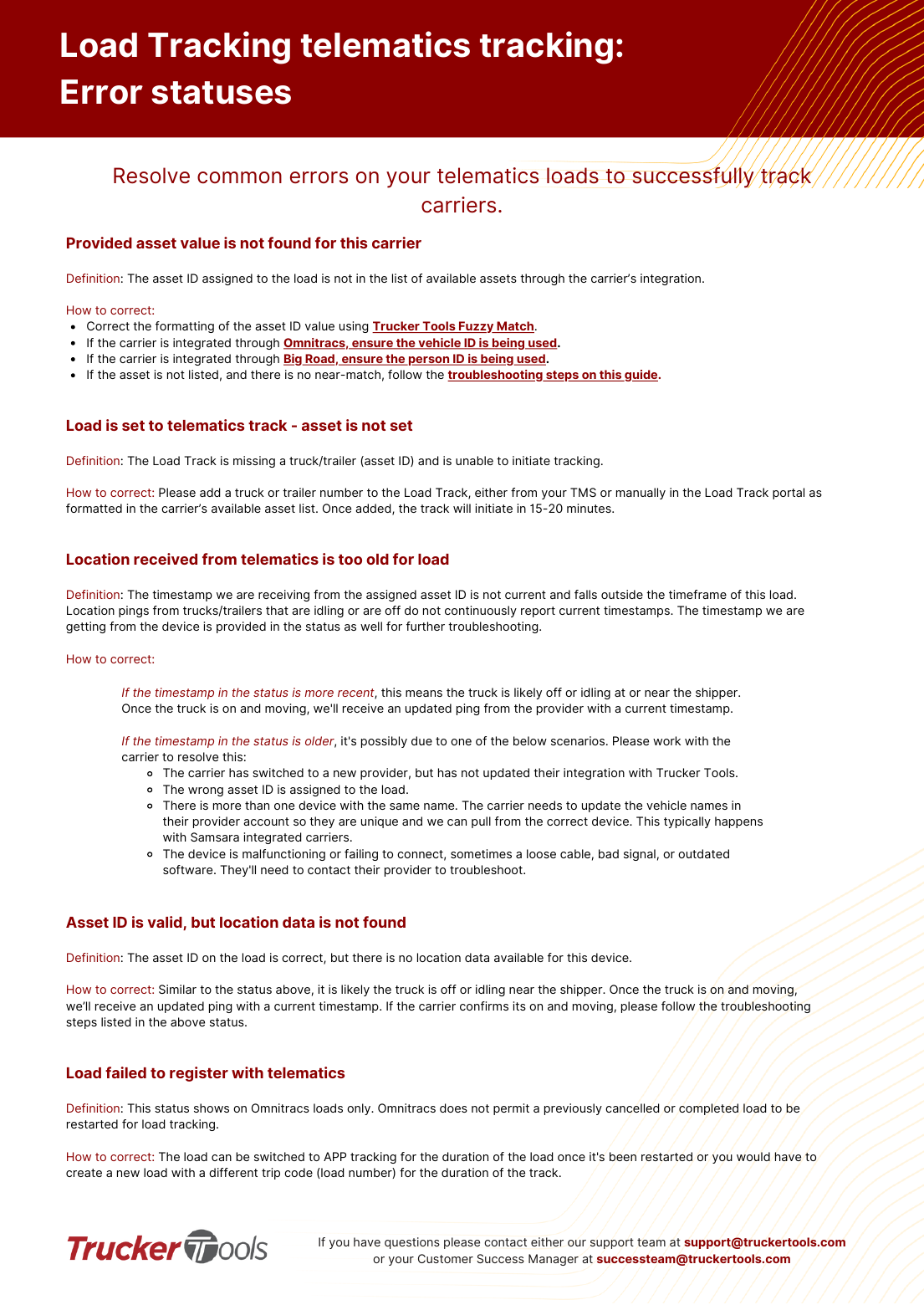
Telematics tracking error statuses (and how to fix them)
What each common telematics tracking error means and the steps to resolve it.
Open →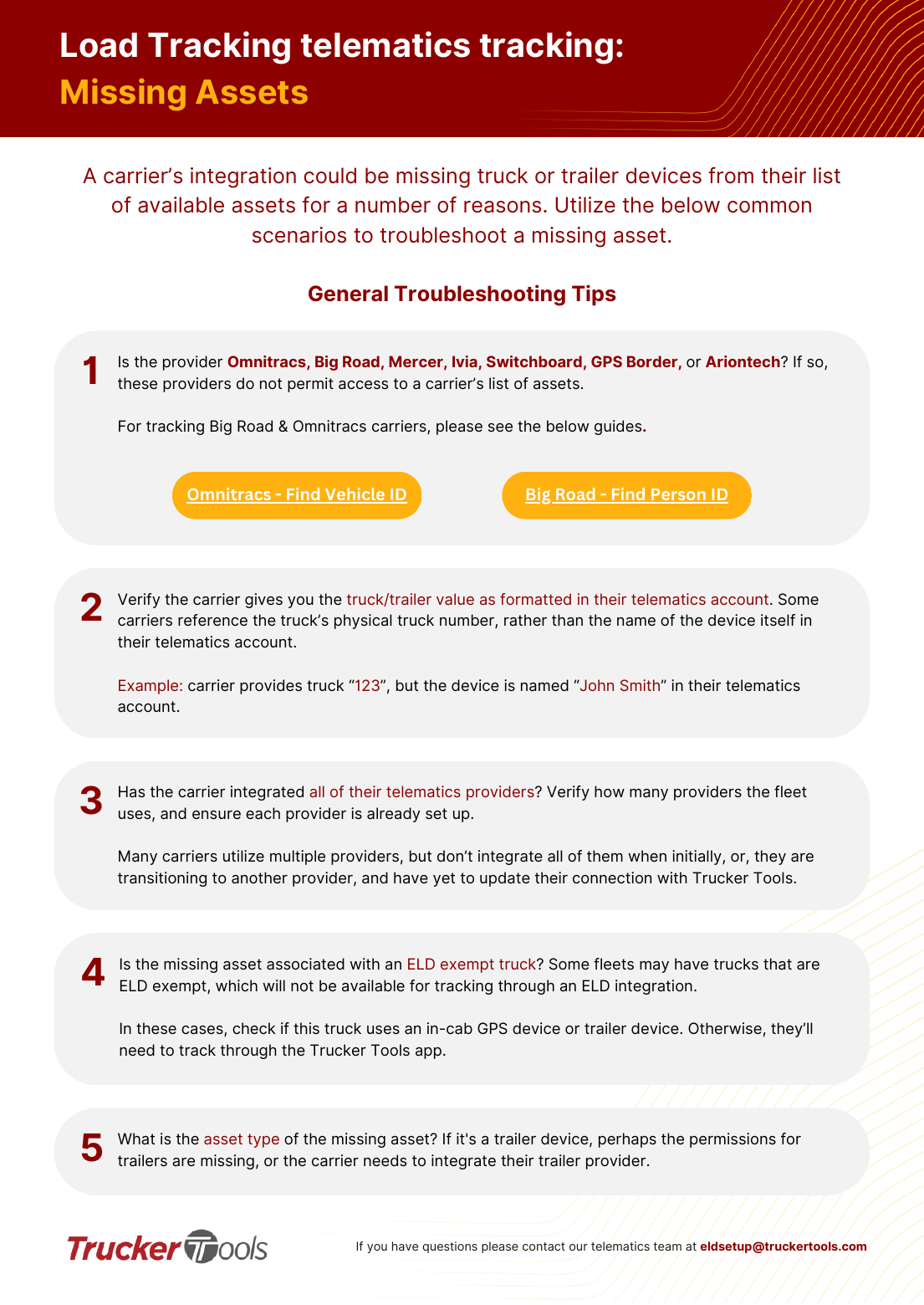 🧑💼 Dispatcher🔌 Integration
Missing assets — troubleshooting (telematics)
Why a truck or trailer may not appear in the available-assets list, with general and provider-specific fixes.
Open →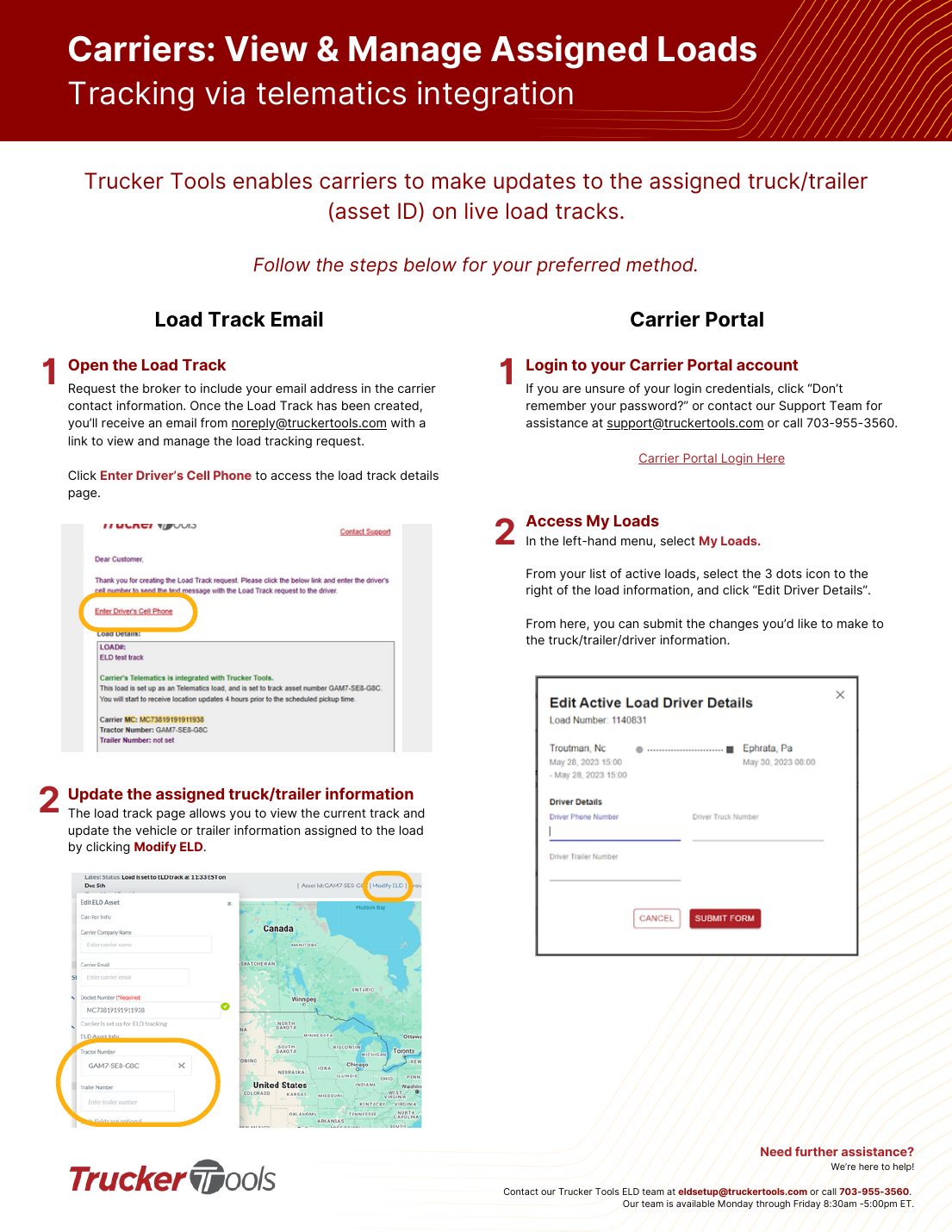 🧑💼 Dispatcher🔌 Integration
View & manage your assigned loads / update the truck
As a carrier, update the assigned truck/trailer (asset ID) on a live telematics load track — by email link or the Carrier Portal.
Open →