Scan and upload documents (Trucker Tools)
Quick answer
Scan a BOL, POD, or other document in the app and it goes straight to the broker's TMS and portal.
First, turn off any VPN. A VPN on your phone hides or fakes your real location and will stop tracking from working. Fully disable any VPN app or setting, then reopen the app.
Scanned documents are delivered directly to the broker the moment you submit.
Choose Scan
While tracking a load, tap Scan from the main screen. Allow the app to use your camera.
📷 Show pictures⌄
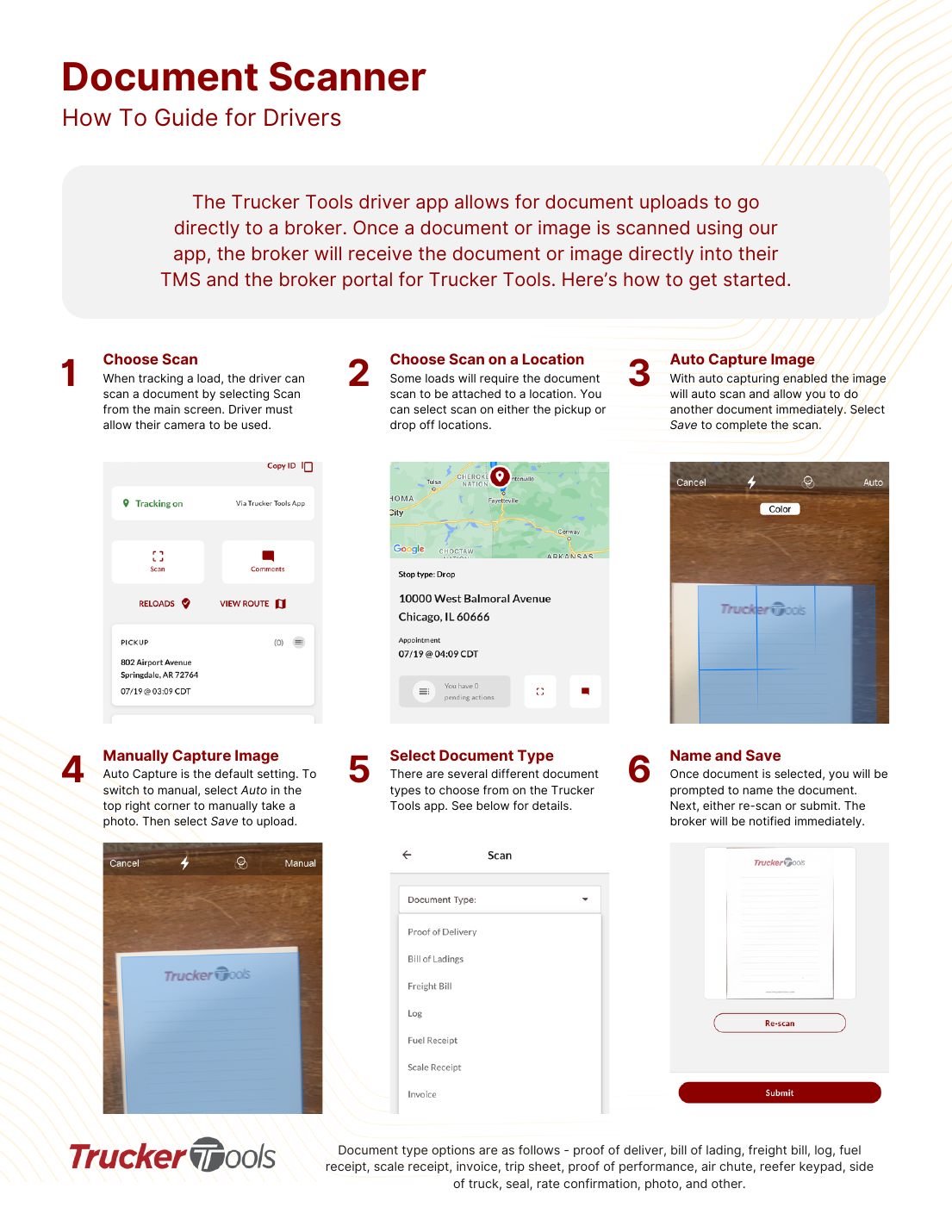
💡 Document types include: proof of delivery, bill of lading, freight bill, log, fuel receipt, scale receipt, invoice, trip sheet, proof of performance, air chute, reefer keypad, side of truck, seal, rate confirmation, photo, and other.
AI summary
Source: Tracking Help Center — load-tracking help from the makers of BotLine.
Still stuck?
Ask the AI assistant a question, or check the FAQ.