🚛 Driver📲 App
Fix location settings — Android
Quick answer
Set Trucker Tools location to 'Allow all the time' with Precise Location to keep tracking reliable.
🚫
First, turn off any VPN. A VPN on your phone hides or fakes your real location and will stop tracking from working. Fully disable any VPN app or setting, then reopen the app.
A red banner means location isn't set correctly. Set it to Allow all the time.
Step 1 of 6
1
Tap the notification
If location isn't set correctly, a red banner appears at the top prompting you to change settings to Allow all the time.
📷 Show pictures⌄
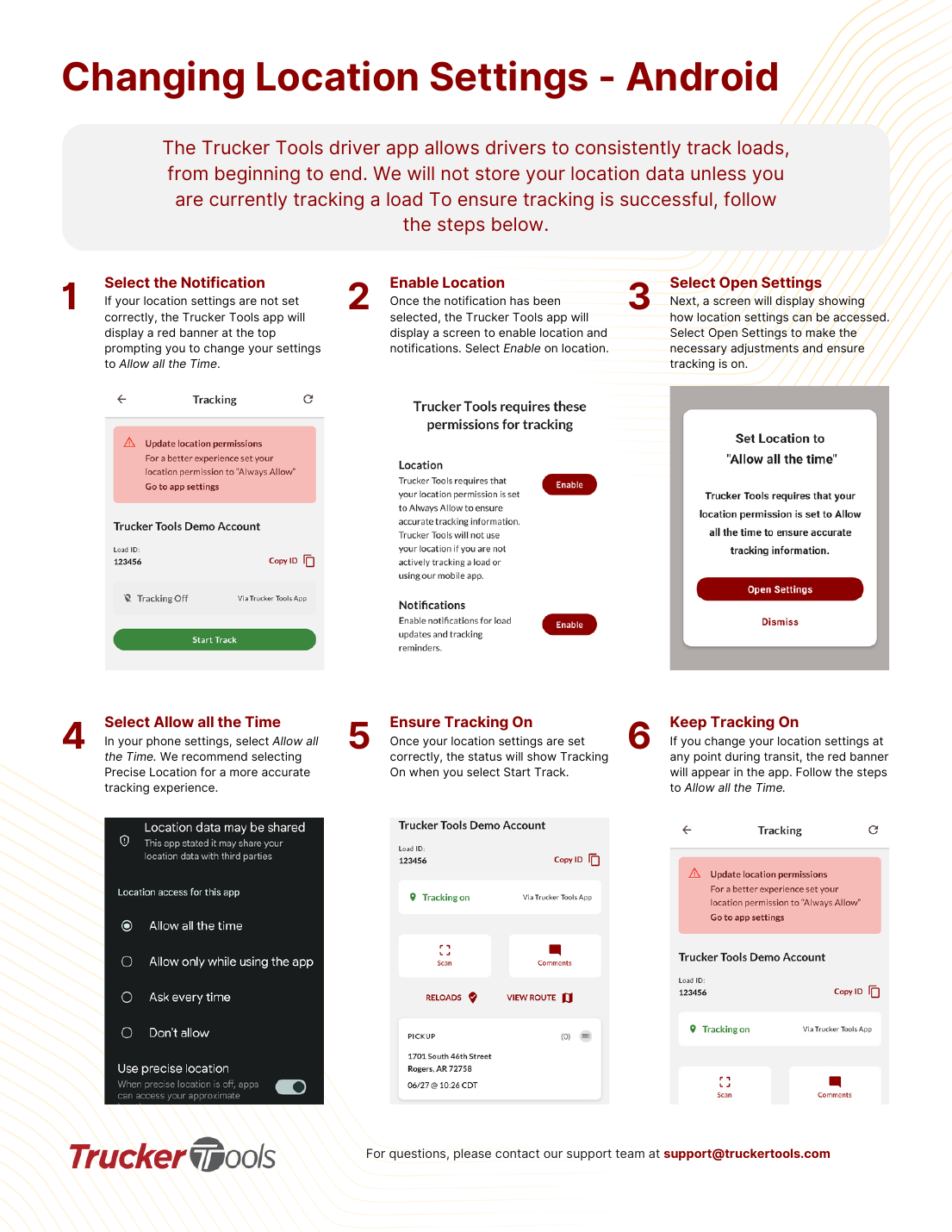
💡 Trucker Tools does not store your location unless you're actively tracking a load.
AI summary
Set Trucker Tools location to 'Allow all the time' with Precise Location to keep tracking reliable.
Source: Tracking Help Center — load-tracking help from the makers of BotLine.
Still stuck?
Ask the AI assistant a question, or check the FAQ.
Was this helpful?